|
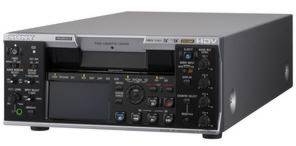
HD/SD-SDI Output
The HD/SD-SDI
output of HVR-M35E allows straight duplication to a deck with
HD/SD-SDI input.
Multi-format
Playback/Recording
Capability
The
HVR-M35E supports HDV native progressive
recording modes and has a 60i/50i switchable function, so it can
playback/record:
•HDV1080i:
60i/50i/24p/30p/25p
•DVCAM/DV:60i/50i
•The HDV720p(24/25/30p) tape playback
is available for a simple
viewing.*
*No i.LINK output for
HDV720p
Standard and Mini Size Cassette Tape
Compatibility
Both standard and mini size cassette
tapes are supported. It accepts standard cassettes shot on the
HVR-S270E or other
shoulder-mount DVCAM
camcorders.
2.7-inch Wide Clear Photo LCD plus Screen and Monaural
Speaker
A built-in 2.7-inch type wide Clear Photo
LCD plus™ screen and built-in monaural speaker allow quick
and convenient checking of video and
audio.
Other
Functions of the
HVR-M35E
The HVR-M35 covers most functions of its
lower-end model, the
HVR-M25.
Down-conversion Playback
Capabilities
The HVR-M35P can convert material from HD down to SD,
and output the SD video signal through its i.LINK, SD-SDI, analogue
component, S-video, and composite connectors. This allows users to
edit recorded material with a compatible nonlinear editing system
using current DV editing software, as well as record SD signals to
an external VTR. When down-converting these signals, the aspect
ratio displayed can be converted from 16:9 to 4:3. Display modes
can be selected from Squeeze, Letterbox, and Edge
Crop*16.
*16 Letterbox
output is not available from the i.LINK connector. For the HDV
recording with four channels audio data, the audio data in the
down-converted DV signal is selectable from either 1/2ch or
3/4ch.
Edge Crop
Adjust
When down-converting signals in Edge Crop
mode, you can use the Edge Crop Adjust function to adjust the edge
crop position. By displaying the edge crop marker on the LCD
monitor, operators can conveniently check the edge crop position
before outputting downconverted
signals.
DUPLICATE
PLUS
The DUPLICATE PLUS
function makes it easy to copy video and audio from a VTR or
camcorder onto the HVR-M35P – along with the original time
code. Operators simply connect the two i.LINK devices together via
their i.LINK interfaces and press the DUPLICATE PLUS and PLAY
buttons on the front panel of the HVR-M35E. Copying will then
begin.
Supplied
Accessories
Remote Commander Unit (1), power cord (1),
size AA batteries
(2),
cleaning cassette (1), operating
instructions (1)
A range of accessories is available for
the new camcorders, including a Camcorder Support, an AC Adaptor
Charger with four-battery slot, an LCD hood and
more.
|