|
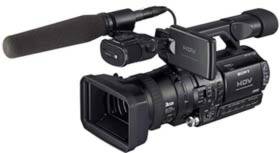
DVCAM Support / HVR-Z1P hvr-z1p
The DVCAM™ and DV formats are supported by
the HVR Series to offer full backward compatibility with the
standard definition DV world. Users can also select 16:9 and 4:3
modes both for DVCAM and DV operation.
60i/50i Switchable /
HVR-Z1P HVR-Z1P
hvrz1p
The HVR-Z1 is unique in its ability to record HDV and DVCAM
images at 60i, 50i,-in either SD or HD. Switchable 60i/50i allows
professional users to create their content on a worldwide basis,
not having two separate camcorders with two different
versions.
Color Correction
The Color Correction function allows users to adjust the
color of a target object without affecting the color of other
objects. This feature can be used to create special effects, for
example, showing the color of a red apple only on B&W picture.
Up to two colors can be selected as target colors and each can be
controlled in terms of color phase, color phase width and color
gain as well as skin color.
Versatile Timecode/Userbit Operation
Timecode/Userbit Preset function
allows any time to be selected as a starting timecode. Also, "DF"
or "NDF," "Rec Run" or "Free Run" and "Regenerate" or "Preset" can
be selected for the timecode operation.
Multiple Assign Button Functions /
HVR-Z1P
The HVR-Z1 has six assign buttons compared to three buttons on
the HDR-FX1. Functions such as "AE Override," "White Balance Shift
for Outdoor," "Hyper Gain," and "All Scan Mode" are also featured
on the assignable menu. "Back Light," "Spot Light" and "Rec Review"
are also on the assignable menu.
Viewfinder B/W and Color Selectable
The user can operate the viewfinder in color or in
black-and-white.
Simultaneous Operation of LCD panel and
Viewfinder / HVR-Z1P
The camcorder's LCD panel and viewfinder can be operated
simultaneously. "LCD panel" or "VF turn on" can be selected through
the "VF Power" menu. If "Auto" is selected, the viewfinder will
turn on only when the LCD panel is closed, and if "On" is selected,
both LCD panel and Viewfinder will be
operating.
All Scan Mode
"All Scan Mode" is similar to the "Under Scan Mode" of other
high-end camcorders. This feature is useful when checking image
quality for Web applications. However, unlike the "Under Scan Mode"
of other high-end camcorders, the HV blanking area is not
displayed.
Auto Exposure Override
While in the Auto Iris mode, AE can be shifted by using Iris
dial. This allows the user to adjust Iris easily (or Gain if Gain
is set to Auto).
Black Stretch
Black Stretch function raises only the black portion of an image
to broaden dynamic range.
4:3 Output
The HVR-Z1 offers several features useful for videographers who
also need to output 4:3 images. The converted SD output
(i.LINK® Output, S-Video Output or Composite Output) can be
connected to compatible SD devices. If the monitor is 4:3, "Letter
Box" can be selected and if the monitor is 16:9, "Squeeze" can be
selected.
Edge Crop at 4:3
Unique to the HVR-Z1 is the "Edge Crop" mode. This mode is ideal
for 4:3 shooting and unlike "Letter Box" or "Squeeze," "Edge Crop"
can provide a normal picture that will fill a 4:3 screen. For
supporting this function, a viewfinder/LCD panel 4:3 safety marker
is added by selection in the Marker Select
Menu.
|